Fitness App Development: What US Founders Need to Know Before They Build
Fitness app development covers workout tracking, personalised coaching, nutrition, recovery, and wearable-based monitoring. Step counters, AI coaching apps, corporate wellness platforms, and camera-based training tools all fall under that umbrella. .

Niti Aggawal
·10 min read
bg green: Quick Summary
- Fitness app development in the US typically costs $40,000 to $250,000, and enterprise platforms with live classes or advanced AI can exceed $400,000.
- Timelines land between 10 and 22 weeks for an MVP, longer once wearable sync or live video enters the scope.
- Google is retiring the Google Fit APIs, so any fitness tracking app development plan built on them needs Health Connect instead.
- Computer vision coaching, watching form through a phone camera, is a real differentiator now, not a gimmick.
- Native versus cross-platform changes your cost, your timeline, and how far you can push camera-based features.
Fitness app development covers workout tracking, personalised coaching, nutrition, recovery, and wearable-based monitoring. Step counters, AI coaching apps, corporate wellness platforms, and camera-based training tools all fall under that umbrella.
Each solves a different problem for a different user. The category is growing fast. The global fitness app market was worth $13.9 billion in 2026 and is on track to reach $33.6 billion by 2033. That growth is why the market feels crowded. A generic tracker with no clear angle struggles to hold users past the first month.
What Does Fitness App Development Actually Involve?
Fitness app development involves five connected pieces: product strategy, UI/UX design, mobile engineering, backend and data infrastructure, and QA. Skip one, and that's usually how a project blows past budget.
Strategy decides who the app serves and what it tracks. Design turns that into screens a tired person can use one-handed after a workout. Not a polished mockup that falls apart in real use.
Engineering builds the tracking, the sync, and the social or coaching layer that keeps people opening the app. Backend work handles accounts, activity data, and payments behind the scenes.
QA catches the bugs that show up mid-set in a real gym, not the ones a clean demo video hides. Teams that treat these five pieces as one process, not five handoffs, ship apps people actually stick with.
Retention is where most projects fail. Research shows up to 80% of new users disengage from a fitness app within three months of installing it. Most of that churn starts in the first two weeks, not because of a missing feature found later. Onboarding and early habit-forming moments belong in the first release, not a later polish pass.
How Much Does Fitness App Development Cost in 2026?
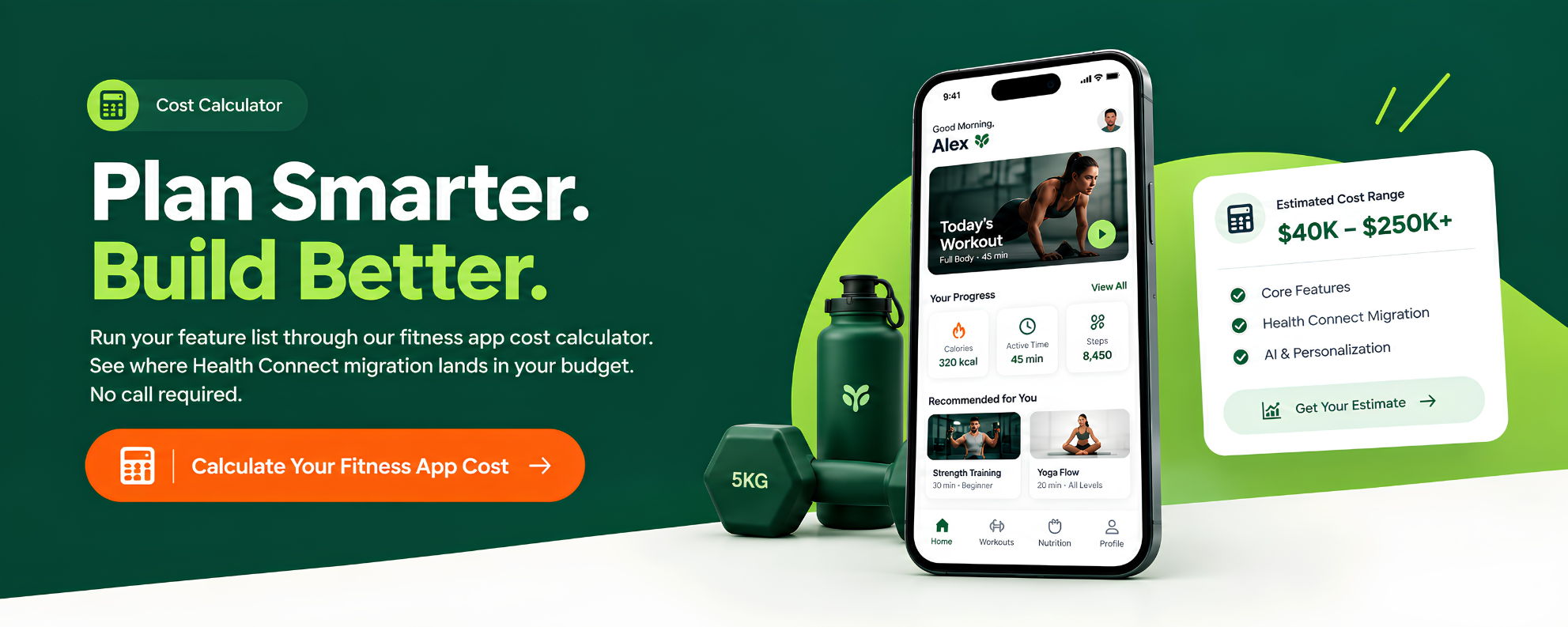
Costs in the US range from $40,000 to $250,000. Feature scope and integration depth do most of the work in that range. Enterprise platforms with live classes, advanced AI, or heavy compliance needs can cost more than $400,000.
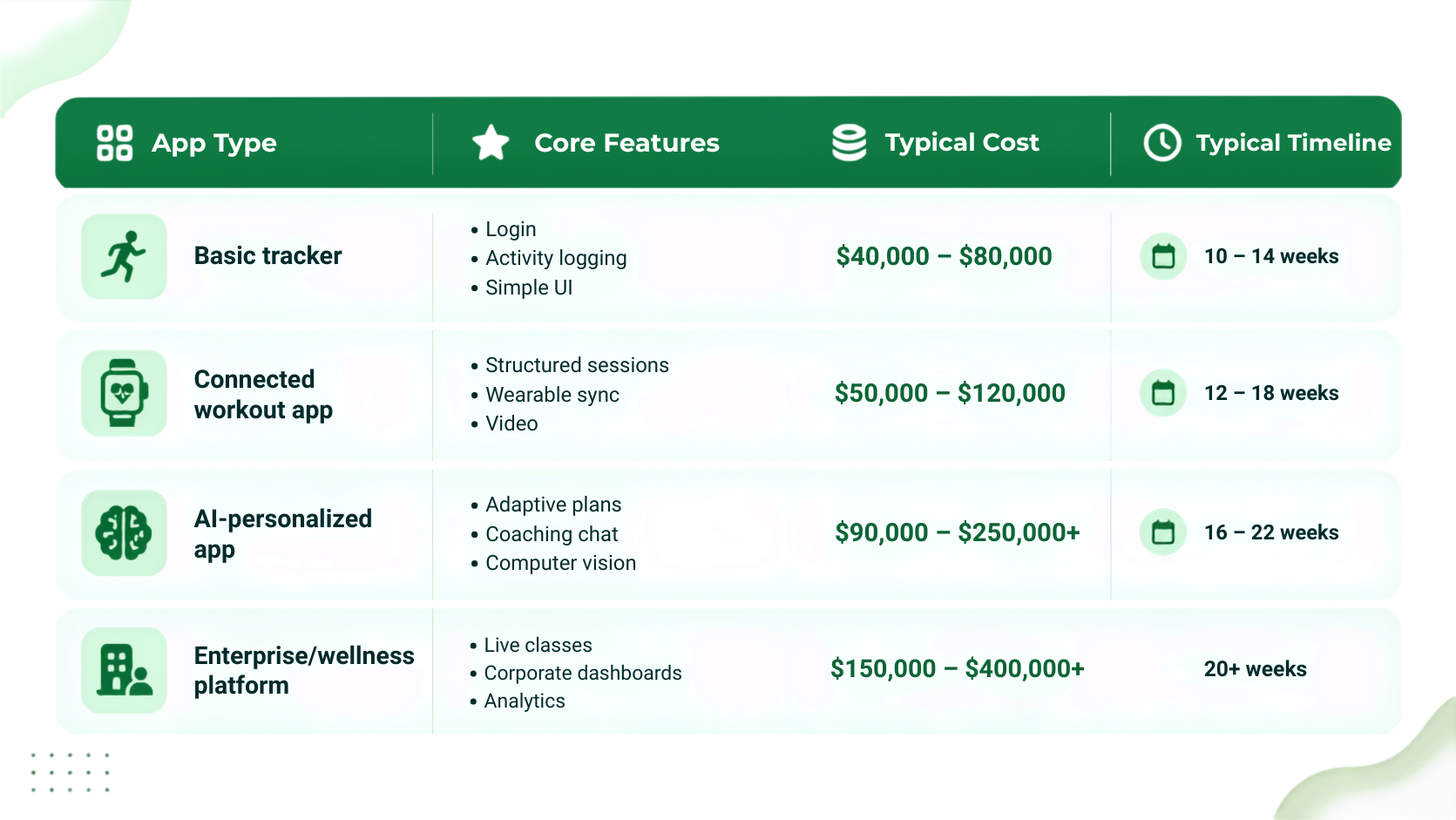
These numbers match broader market data: basic apps run $40,000 to $80,000, mid-level apps with video and payments run $80,000 to $150,000, and advanced AI-driven apps run $150,000 to $400,000 or more.
Three things move the price more than any feature checklist: wearable API integrations, whether tracking uses computer vision or manual logging, and how much post-launch support gets budgeted up front. Most founders underestimate that last one. They get hit with year-one maintenance costs they didn't plan for.
A common rule of thumb is to set aside 15 to 20% of the build cost each year for bug fixes, OS updates, and small feature work. This varies by app complexity and support scope.
Your monetisation model shapes cost too. A free app with in-app purchases needs less backend work than a subscription with trial periods, grace periods, and win-back flows. Pin down the business model before pricing the build.
Is Native or Cross-Platform Better for Fitness Mobile App Development?
Native development works better when your app leans on camera-based tracking, precise motion sensors, or Apple Watch companion features. It gives direct access to hardware APIs. Cross-platform fits better when you need both platforms fast, on a tighter budget.
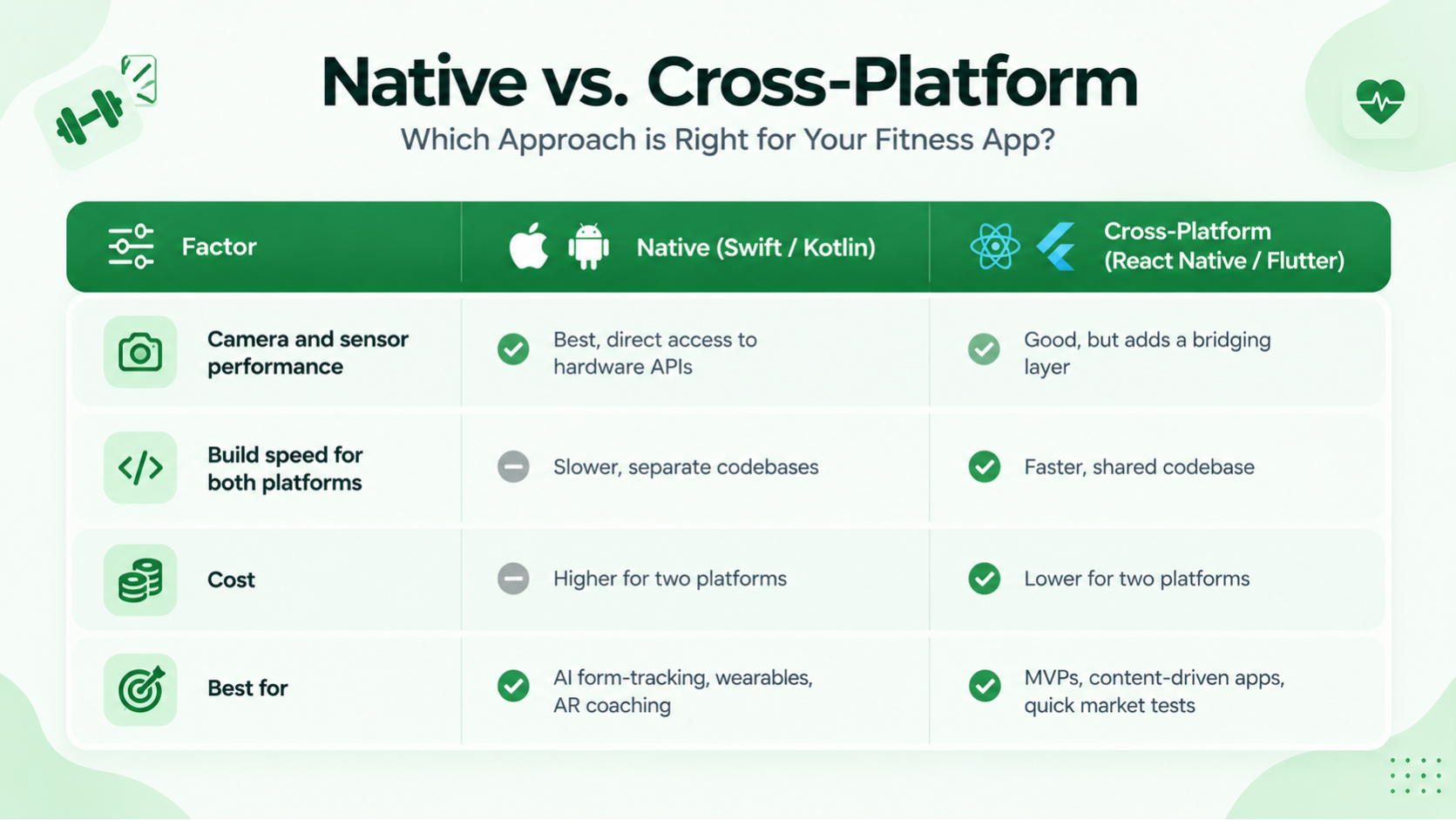
Neither option wins every time. A cross-platform mobile app development build can get a workout tracker to market fast on a limited budget. For an early MVP, that's often the right call.
A camera-heavy AI coaching app does better as a native iOS build. Posture tracking needs tight control over camera frame rate and on-device processing. Bridged frameworks handle that less predictably.
Can You Build an AI Fitness App Without It Feeling Gimmicky?
We ran into that exact problem building Motus, our camera-based rep-counting app. See the full breakdown of the Motus build further down this page. If AI is on your roadmap, skip the question "can we add AI?" Ask which tracking or coaching problem AI solves for your user.
What Does the Fitness Mobile App Development Process Look Like Step by Step?
A well-run fitness mobile app development process moves through five stages. This holds whether the team is building a simple tracker or a full AI platform.
- Discovery and scoping. Define the core user, the tracking method, and which features are true MVP versus phase two.
- UI/UX design. Wireframe and prototype the flows that matter most: onboarding, the active workout screen, and progress views.
- Development. Build the tracking engine, backend, and integrations in parallel sprints, two to four weeks each.
- QA and testing. Test tracking accuracy under real conditions, not just clean demo footage. Load-test the backend too.
- Launch and iteration. Ship to the App Store or Play Store, then iterate on retention data from the first few weeks of real usage.
Skipping discovery is a common reason these projects run over budget. Teams that jump straight to design end up redoing core screens mid-build once tracking constraints show up. A team that hasn't tested camera-based or sensor-based tracking on real bodies, in a real gym, finds the accuracy problems weeks too late.
How LoudOwls Built Motus: A Camera-Based Fitness App Case Study
Motus is an iOS training app. It tracks posture through the front camera and counts reps in real time, set by set. No wearables needed. Just the phone already in the user's gym bag.
The brief was simple to describe and hard to deliver. Four constraints shaped the build:
- Movement, not a static frame. Most computer vision demos assume a clean, still frame. Motus had to read posture while the user was moving.
- Sets, not a continuous stream. Workouts happen in sets, not one unbroken activity. Tracking had to start, pause, and resume around a 30-second rest window.
- Social from day one. A tracker with no one to share progress with gets deleted once the novelty wears off. The social feed, streaks, and kudos shipped in the first release, not later.
- One action, busy hands. Once a set starts, a user's hands are busy. Tracking, counting, and recording all had to trigger from one action.
The team built Motus natively in Swift and SwiftUI. GuruSDK handled body tracking. On-device screen recording captured each set. Supabase ran accounts, session data, and the social feed. The team used Swift for the camera and motion-heavy parts of the experience, where tighter control over frame processing mattered.
The result is a fitness app built for how people actually train. Sweaty hands. Bad gym lighting. A phone propped against a water bottle. Not the clean setup in a studio demo.
What Should Fitness Tracking App Development Get Right on Wearables and Data?
Fitness tracking app development has to get wearable integration right, and the ground just shifted. Google is retiring its Google Fit developer APIs in 2026. It hasn't accepted new developer signups for them since May 1, 2024. That affects any older app still pulling Android activity data through that route.
New Android builds should integrate with Health Connect instead. It's what Google now recommends for reading and writing on-device fitness and health data, built for Android's current permission model.
On iOS, HealthKit remains the standard for step counts, heart rate, and workout data.
If a development quote still lists "Google Fit integration" as a 2026 line item, that's outdated scope. Ask a prospective partner about it before you sign anything. Beyond wearables, this means handling sensitive activity and body data with care from day one: clear consent screens, minimal data retention, and encryption in transit and at rest. We applied that same discipline building a health data platform for a preventative wellness client, where governing sensitive health information wasn't optional.
Do Fitness Apps Need to Follow HIPAA or State Health Privacy Laws?
HIPAA doesn't cover many consumer fitness apps. HIPAA applies to covered entities and their business associates, so whether it applies depends on how your app handles health information and who it works with.
States including Washington and Connecticut have passed consumer health data laws that cover activity and biometric data, with real penalties attached.
If your app tracks anything body-related, budget for a privacy review alongside the build. Don't wait for a state regulator to ask for one.
What Do the App Store and Play Store Actually Require for Fitness Apps?
Apple applies additional privacy and review requirements to health and fitness apps, especially those using HealthKit, camera access, or sensitive health data. Clear permission explanations are required when requesting HealthKit access, and unclear or incomplete disclosures can create App Store review issues.
Budget a review pass before submission: clear permission strings, an accurate subscription disclosure if you monetise that way, and a privacy nutrition label that matches what the app actually collects.
Common Mistakes Founders Make Before They Even Hire a Team
The most expensive mistakes happen before development starts. Locking a feature list before user-testing the core workout flow. Choosing cross-platform for a camera-heavy app because it's cheaper, then hitting a performance wall in month two. Skipping the Health Connect and HealthKit conversation until wearable sync is already in the sprint plan.
None of these shows up on a feature checklist. They show up as a rebuild three months in.
What Features Actually Move the Needle on Retention?
Three feature categories can support retention: goal-based gamification, social accountability, and well-timed notifications.
- Gamification helps when it's tied to something the user already cares about, like a streak on an exercise they chose. It does little as a generic points system slapped onto every screen.
- Social features work the same way. A feed where friends see and react to a finished workout gives people a reason to show up on low-motivation days. That's exactly where most early churn starts.
- Push notifications deserve more restraint than most teams give them. One well-timed nudge can be more useful than repeated generic reminders that users quickly learn to ignore. Personalisation, AI-driven or just goal-based, keeps the app relevant as a user's fitness level changes. A plan that never adapts starts to feel like it was built for someone else.
How Do You Choose a Fitness App Development Company?
Skip the portfolio screenshots. Ask three questions: has this team shipped camera-based or sensor-heavy tracking before, do they own the full stack from design through backend, and what does post-launch support actually cover?
Many agency comparison lists online are little more than directories: names, a one-line service tag, no real detail on process or pricing. Fine for building a shortlist, not for making the final call. Ask any shortlisted fitness mobile app development partner about a specific tracking accuracy problem they solved, not just a feature list. That answer says more about their engineering depth than any case study slide.
Why Founders Building Fitness Apps Work With LoudOwls
We've shipped 150+ mobile and web projects since 2018. Client satisfaction sits at 98%, and support runs 365 days a year, not just launch week. Motus, covered above, is one proof point. It's a camera-based rep-counting app that had to hold up in a real gym, not a demo studio.
Hoag Compass is another, in a different field. It's a patient app for a preventative wellness program, built for a healthcare client where data privacy wasn't optional. It handles appointment scheduling, health records, and doctor chat in one place. The tracking problem was different from Motus: less about motion accuracy, more about handling sensitive health data correctly from the first screen.
The build discipline was the same. Real problems get solved before launch, not patched after users complain.
Our team covers product strategy, UI/UX, native and cross-platform engineering, and QA under one roof. A fitness app doesn't get handed between three vendors before it ships.
Frequently Asked Questions
- How much does fitness app development cost in the US?
Costs in the US run between $40,000 and $250,000, depending on whether you're building a basic tracker or an AI-personalized platform with computer vision and wearable sync. Enterprise wellness platforms with live classes or advanced AI can exceed $400,000.
- How long does it take to build a fitness app?
Most projects take 10 to 22 weeks for an initial launch. Basic trackers ship faster, in 10 to 14 weeks. AI-personalized or computer vision apps need 16 to 22 weeks for the extra tracking work.
- Is Google Fit still supported for fitness tracking app development?
Google is retiring the Google Fit developer APIs in 2026 and has not accepted new developer signups since May 2024. New fitness tracking app development on Android should integrate with Health Connect instead.
- What makes an AI fitness app different from a regular tracker?
An AI fitness app uses adaptive programming, conversational coaching, or computer vision to personalise workouts and correct form in real time, instead of just logging manually entered activity. The strongest ones solve one specific problem well instead of adding AI as a checkbox feature.
- Should a fitness app be built native or cross-platform?
Build native when your app depends on camera-based tracking, precise sensor access, or deep wearable integration, since native code gives tighter control over hardware performance. Cross-platform frameworks work well for content-driven apps or fast MVPs.
Ready to Scope Your Fitness App?
Fitness app development rewards teams that solve one tracking or coaching problem well, instead of chasing every feature on a competitor's list. Whether that means a lean MVP or a computer vision build like Motus, the scoping conversation decides the real cost and timeline, long before the first sprint starts.