How to Build Custom AI Agents: The 2026 Playbook for Founders and Product Teams
A custom AI agent is software built around a large language model. It plans, calls tools, and completes multi-step tasks toward a business goal with limited human input.

Pardip Bhatti
·10 min read
bg Green: Quick Summary
- What separates a custom AI agent from a chatbot, a copilot, and plain workflow automation.
- The four types of AI agents, real-world use cases by industry, and a build-vs-buy framework for deciding if a custom agent is worth it.
- How an agent actually reasons and acts — the AI agent architecture and frameworks that power the loop — and what it takes to build an AI agent in production.
- Realistic 2026 AI agent development cost ranges by agent type, so you can budget before you talk to a vendor.
- The security, compliance, and human-oversight questions to sort out before launch, and the mistakes that turn a promising AI agent development pilot into a stalled project.
CTA Green: Discuss Your AI Agent Idea
A custom AI agent is software built around a large language model. It plans, calls tools, and completes multi-step tasks toward a business goal with limited human input.
This guide unpacks custom AI agent development piece by piece. You'll see what an agent is made of, what it costs in 2026, and how a build moves from idea to production.
What Is a Custom AI Agent?
Think of it as a co-worker rather than a search box. It plans a sequence of actions, decides which tools to call, and checks its own work along the way.
A chatbot works differently. It answers questions inside a single conversation and stops there, without acting on your systems or carrying a task forward.
"Custom" matters as much as "agent." Off-the-shelf products work from someone else's assumptions about your data and workflow. A custom build starts from your systems, your rules, and your definition of done.
Three traits define a working agent, regardless of industry:
- Goal-directed autonomy. It pursues an outcome across multiple steps, not just a single reply.
- Tool use. It calls APIs, databases, and internal systems instead of only generating text.
- Memory and context. It retains enough state to make the next step logical.
Types of Custom AI Agents
Not every custom agent works the same way. Most fall into one of four types, and knowing the difference helps you scope the right build.
- Reactive agents. They respond to a single trigger with a single action, like flagging a ticket for review. No planning, no memory.
- Deliberative agents. They plan several steps and weigh options against a goal before acting. Most "agentic" products fall here.
- Hybrid agents. They combine fast reactive responses with deliberative planning, switching modes based on how complex the decision is.
- Multi-agent systems. Several specialised agents divide a task and hand pieces off to each other, like a small team.
Most businesses should start with a single deliberative agent scoped to one workflow. Multi-agent systems earn their added complexity only once that first agent proves reliable in production.
How Does a Custom AI Agent Actually Work?
Every production agent runs some version of the same loop, regardless of framework. An event comes in, the agent pulls relevant context, and reasons about what to do next.
From there, it picks a tool, takes the action, and checks the result. Depending on what it finds, it continues, stops, or hands off to a person.
That last branch, escalation, keeps a well-built agent from quietly making a bad call at scale. Skip it, and the rest of the architecture doesn't matter much.
Core Components of AI Agent Architecture
Sense, reason, act, check — those four steps make up the core of AI agent architecture. It's why teams that jump straight to "which framework should I use" often rebuild the same project twice.
Get the loop right first. The framework just executes it.
A few architectural pieces show up in nearly every serious build:
- Retrieval layer. Pulls in documents, records, or knowledge base entries before the agent reasons, usually through retrieval-augmented generation.
- Tool and permission layer. Defines exactly which systems the agent can touch and what it can do there.
- Evaluation and observability. Logs every decision path so a human can audit why the agent did what it did.
- Escalation path. A clear rule for when the agent stops and asks a person, instead of guessing.
How Much Human Oversight Should an Agent Have?
Every agent needs some human checkpoint, but how much varies by task. Three patterns cover most cases.
- Pre-action approval. The agent proposes an action, and a person approves it first. Best for rare, high-stakes moves like sending contracts.
- Sampling review. The agent acts on its own, and a share of cases route to a human afterwards. Works well for high-volume, routine tasks.
- Confidence routing. The agent flags its own uncertain calls for review. This only works if its self-assessment is well-calibrated, which is harder than it sounds.
Decide the oversight model before writing any code, not after the first mistake. Build the review process alongside the agent, since bolting it on later usually means a backlog nobody catches up on.
Which Framework Should You Build On?
Framework choice depends on the shape of the work, not on which name is trending this quarter.
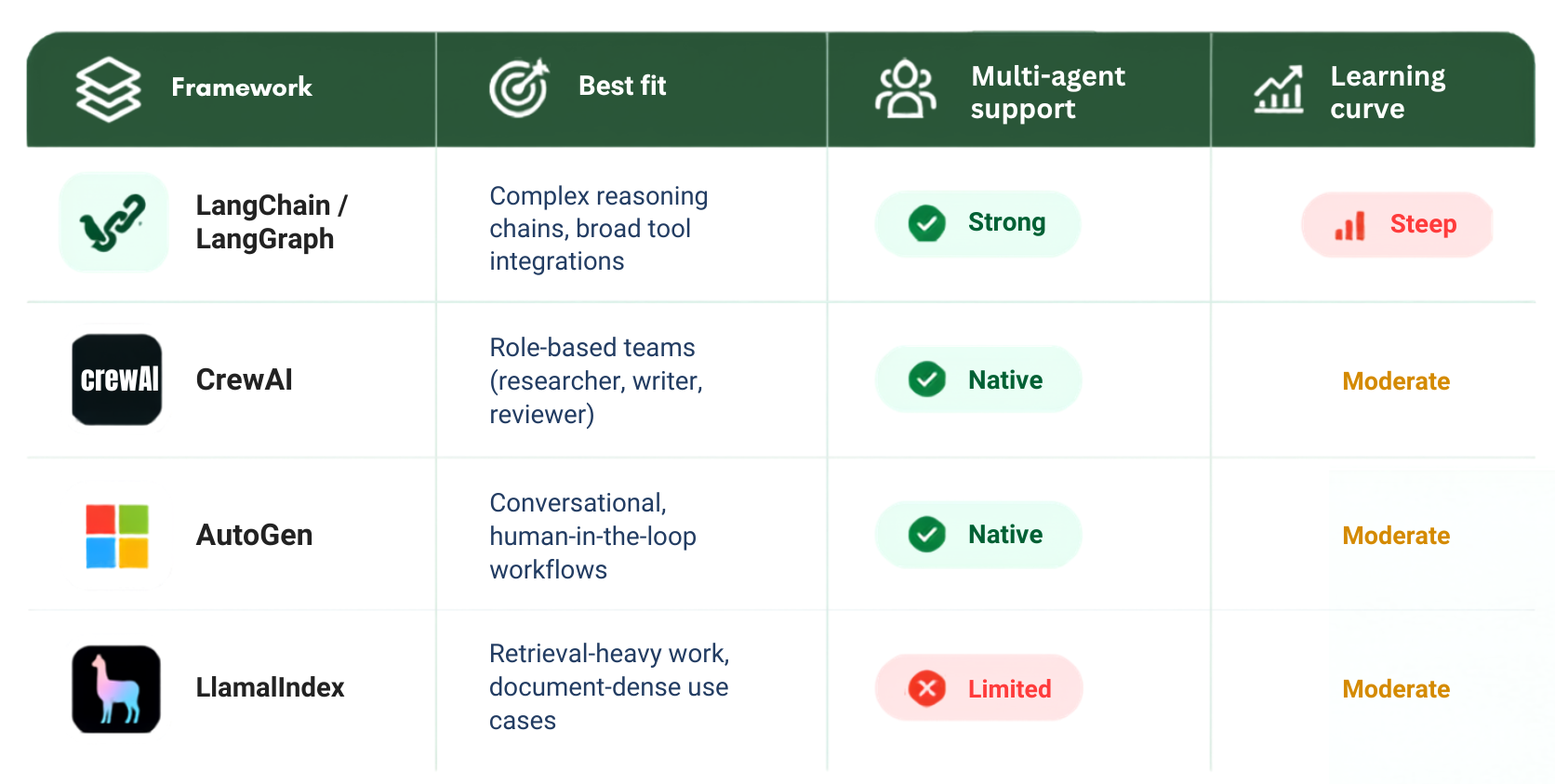
Many production systems combine two of these. LangChain or LlamaIndex often handle tool integration and retrieval, while CrewAI or LangGraph manage orchestration on top.
There's no single correct stack. Pick the one that fits your workload, your team's language preference, and how much control you need over state transitions — whether you build an AI agent in-house or with outside help.
Custom AI Agent vs. Chatbot vs. Copilot vs. Automation
Marketing copy tends to muddy these lines, so it helps to see the four side by side.
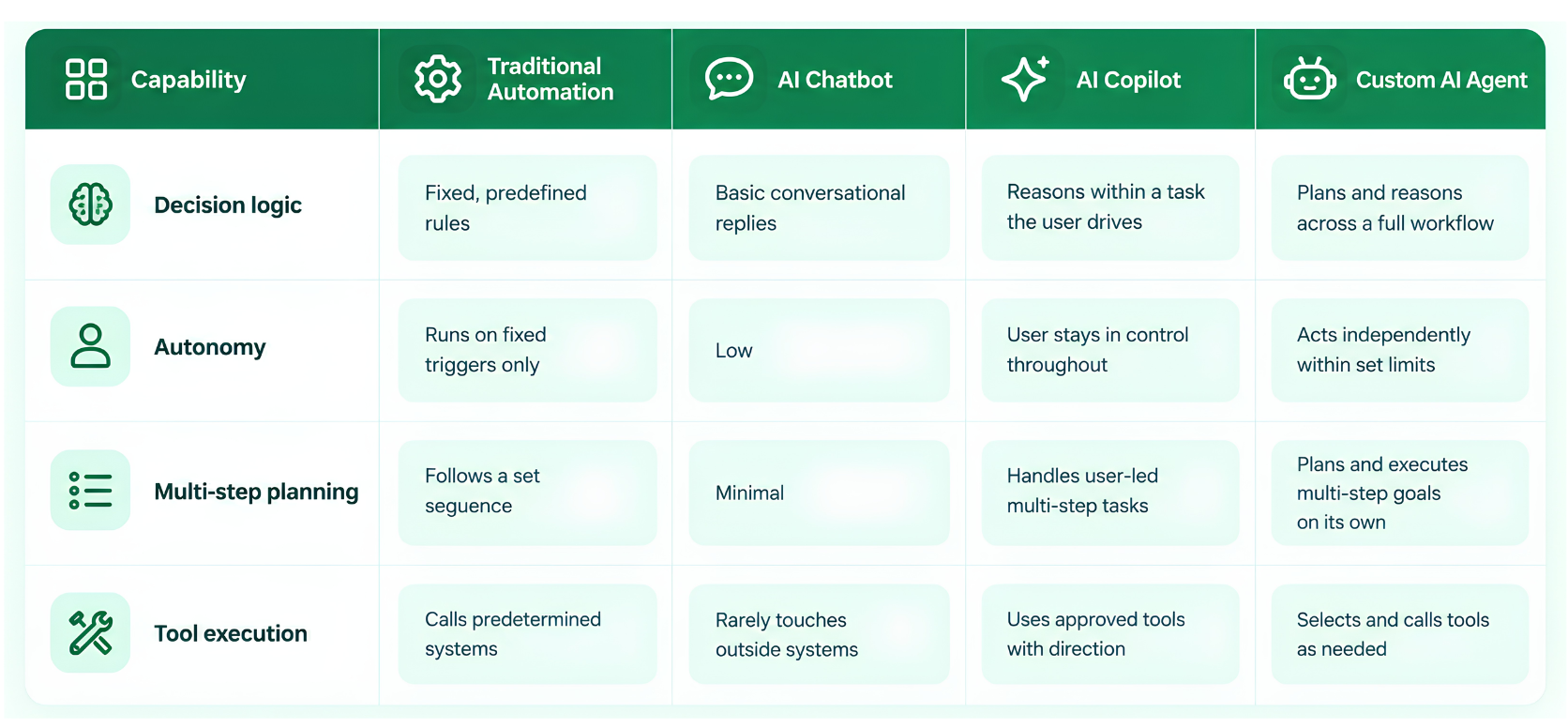
If your process only ever follows the same three steps in the same order, traditional automation is cheaper and more predictable than AI agent automation. Reach for an agent when the path to the goal genuinely varies based on what it finds.
Businesses evaluating AI agent solutions for the first time often start by automating one narrow task, like ticket triage or lead qualification. That's a sound instinct — it gives you a working system to point to before you commit budget to something larger.
Real-World Use Cases by Industry
The right use case depends less on industry and more on how well-defined the workflow already is. A few patterns show up again and again.
- Customer support. Agents triage tickets, pull order history, and resolve routine requests without a human on every case.
- Healthcare admin. Agents schedule appointments, verify insurance eligibility, and draft visit summaries from clinical notes.
- Finance and operations. Agents reconcile invoices, flag anomalies, and route exceptions to the right team.
- E-commerce. Agents manage inventory alerts, personalise recommendations, and handle return requests end to end.
- Logistics. Agents track shipments, rebook delayed deliveries, and notify affected customers automatically.
Agents work best where the steps are clear, but the inputs vary. Highly regulated, one-off judgment calls still need a person in the loop.
Build vs. Buy: Is a Custom Agent Worth It?
Not every business needs a fully custom build. Off-the-shelf tools handle straightforward AI agent automation well when your workflow matches a common template, you don't need deep integration with proprietary systems, and speed to launch matters more than a perfect fit.
Custom development makes more sense when your data and workflows are business-specific, the agent needs to reason across several disconnected systems, or compliance rules out handing data to a third party.
Many teams start with a pre-built tool to prove the concept, then switch to a custom build once the workflow — and the return on investment — is proven.
How Much Does Custom AI Agent Development Cost in 2026?
Pricing varies more than most buyers expect. "AI agent" covers everything from a single-task assistant to a coordinated multi-agent platform.
Industry pricing guides published this year converge on a few consistent tiers once you strip out the outliers.
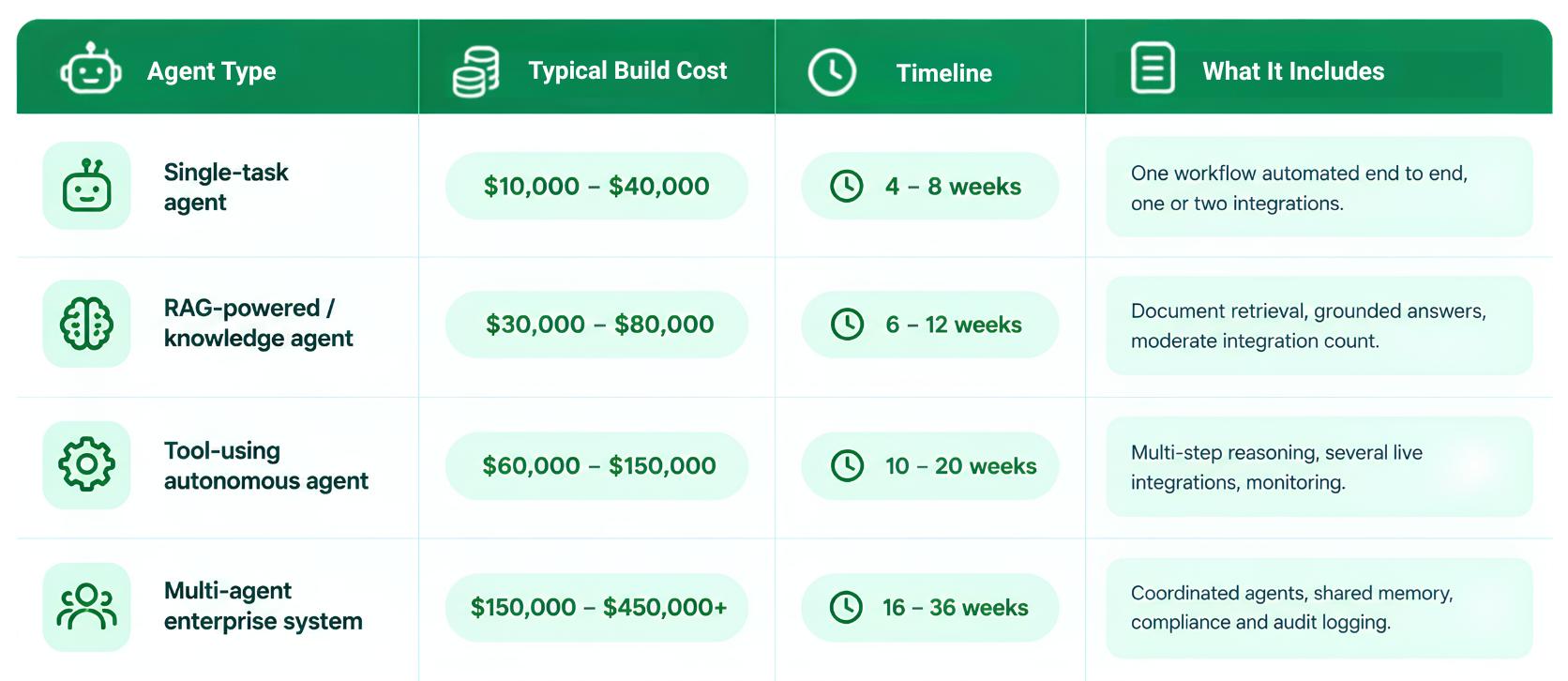
Most mid-market builds land between $40,000 and $150,000, according to several 2026 development-cost breakdowns.
Ongoing Maintenance and Total Cost of Ownership
On top of the build, budget separately for monthly running costs — model API usage, hosting, and monitoring. Ongoing maintenance typically adds another 15 to 30 per cent of the original build cost every year.
AI agent development cost planning often goes wrong right here. Teams quote the build and forget the multi-year total cost of ownership. Ask any vendor for both numbers before you sign anything.
What Does the Custom AI Agent Development Process Look Like?
A disciplined process to build an AI agent follows a fairly consistent sequence, whether the team is in-house or an outside partner.
- Define the outcome, not the technology. Name the specific business result, the autonomy boundary, and what "done" looks like before anyone opens an IDE.
- Map the data and systems. Identify every source the agent will need to read from and every system it will need to act on.
- Choose the architecture and framework. Pick single-agent or multi-agent based on complexity, not ambition.
- Build the reasoning and tool layer. Wire up retrieval, tool calls, permissions, and memory.
- Test against real scenarios, including edge cases. Run the agent against messy, real-world inputs, not just the happy path.
- Deploy with monitoring and an escalation path. Ship with logging in place so every decision is traceable.
- Review and retrain on a schedule. Revisit prompts, tools, and evaluation criteria as usage patterns shift.
The adoption gap mentioned earlier traces back to steps five and six more than anything else. Organisations that build testing, monitoring, and escalation in from day one are the ones moving past pilots.
Common Mistakes Businesses Make When Building AI Agents
Even well-funded AI agent development projects stumble in predictable places.
- Starting with the model instead of the workflow. Picking GPT or Claude before defining the task leads to a solution looking for a problem.
- Skipping the escalation path. An agent with no clear "ask a human" rule eventually makes a costly autonomous mistake.
- Underestimating integration work. The LLM call is often the easiest part. Connecting to legacy systems and cleaning up data access rarely is.
- Treating AI agent automation as a one-time project. Models, APIs, and business rules all shift. An agent without a maintenance plan degrades quietly.
- Building multi-agent systems before single-agent ones work. Add coordination complexity only once the core reasoning loop is reliable.
Security, Compliance, and Data Governance for AI Agents
Giving an agent access to real systems creates real risk. Security can't be an afterthought bolted on right before launch.
- Scope permissions tightly. Give the agent access only to the systems and actions it actually needs.
- Log everything. Every tool call, decision, and output should trace back to its trigger.
- Handle data residency and retention rules upfront, especially in healthcare, finance, or any regulated industry.
- Test for prompt injection and other adversarial inputs before launch, not after.
These aren't optional extras. An agent without clear permission boundaries and logging is a liability, no matter how well it performs on the happy path.
How to Choose an AI Agent Development Partner
When you're evaluating vendors, a few questions separate the serious ones from the rest.
- How do they define the escalation path, not just the happy path?
- How do they test against edge cases before launch?
- What does ongoing maintenance and monitoring actually include?
- Have they shipped agents that touch legacy or industry-specific systems, not just demos?
A strong, specific answer to each question tells you more than a portfolio ever will. Vague answers on any of these points are worth treating as a warning sign.
Why Choose LoudOwls for Custom AI Agent Development
LoudOwls builds AI agent solutions and other custom software for startups and enterprises across Canada, the UAE, and India. Our teams have shipped everything from healthcare apps to camera-based fitness tracking.
That range matters for AI agent development services, because a workable agent has to fit inside a real product, not sit beside one. Our process follows the same checklist above — a clear escalation path, edge-case testing before launch, and monitoring built in from day one.
We also stay involved after launch. Maintenance, retraining, and monitoring are part of the engagement, not a separate line item to negotiate later.
If you're comparing custom AI agent development company options, ask each one how they handle escalation, edge-case testing, and long-term maintenance. Whether you hire AI agent developers in-house or bring in a partner, those answers tell you more than a slide deck ever will.

Frequently Asked Questions
- What's the difference between an AI agent and a chatbot?
A chatbot answers questions within a single conversation and stays passive otherwise. An agent plans a sequence of actions, calls tools, and works toward a goal across multiple steps without needing a prompt for each one.
- How long does it take to build a custom AI agent?
A single-task agent typically takes four to eight weeks. A tool-using autonomous agent with several integrations runs ten to twenty weeks. A full multi-agent enterprise system can take anywhere from four months to nearly a year.
- Do I need my own proprietary data to build a useful agent?
Not always, but it helps significantly. Agents that retrieve from your own documents, records, or knowledge base give more accurate, business-specific answers than generic AI agent solutions relying only on general model knowledge.
- What's the difference between a single agent and a multi-agent system?
A single agent handles one workflow end to end. A multi-agent system splits the work across several specialised agents that hand tasks off to each other, adding coordination complexity most teams don't need at first.
- Which AI agent framework is best for a team just getting started?
CrewAI generally has the gentlest learning curve for role-based, multi-agent setups. Teams that need fine-grained control over state and complex logic tend to reach for LangGraph instead, at the cost of a steeper setup.
- Is my data safe with a custom AI agent?
It can be, if the build scopes permissions tightly and logs every action. Ask your vendor how they handle access control, data retention, and adversarial testing before you commit.
- How much does it cost to maintain an AI agent after launch?
Plan for roughly 15 to 30 per cent of the original build cost every year, covering model updates, integration changes, and monitoring. Budget separately for monthly API usage and hosting costs, which scale with volume.
The Bottom Line
Custom AI agents reward teams that treat them like real software projects. That means a defined outcome, a tested reasoning loop, honest cost planning, and a maintenance budget — not a weekend prototype.
Get those fundamentals right, and the framework you pick matters far less than most vendors will tell you.